Kodo: an ERP that bends to every company's process.
Over 21 months at Kodo (YC W21), I led design for the first release of its procure-to-pay ERP, live with redBus and Brndme, and built the design systems behind it, plus Corporate Cards, NPCI work and the public website.
- Live with redBus and Brndme
- P2P v1Live with redBus and Brndme
- From discovery to first rollout
- 12+ monthsFrom discovery to first rollout
- Components across two design systems
- 1,000+Components across two design systems
- Approved Bharat Connect screens
- NPCIApproved Bharat Connect screens
Role
Lead Product Designer
The brief
Procure-to-pay, rebuilt as one workspace.
Kodo is a YC W21 fintech for business spend. Its new procure-to-pay (P2P) ERP brought purchase requests, approvals, purchase orders, goods receipts, invoices, payments, vendors and accounting into one workspace.
I led product design for P2P v1, from discovery with the first enterprise customers through rollout, working with product managers and engineering. Alongside it I built the design systems, worked on Corporate Cards and NPCI screens, and designed and built the public website in Framer.
Module map
What P2P v1 covered, and what waited.
I designed every module below. 10 shipped in the first release with redBus and Brndme; 2 were fully designed and left for later.
Shipped in v1 · 10
- Requests and approvalsPurchase requests with maker-checker and dynamic multi-level workflows
- PO and GRNPurchase orders and goods receipt notes
- Invoices and paymentsVendor invoices through to payment
- Vendor portal and master dataVendor-facing portal and the master datasets behind it
- Workflow builderAdmins design multi-level approval flows per process
- Permissions and custom rolesRole-based, per module and action, scoped by entity
- Form builderConfigurable fields for each company's documents
- MailboxInvoices captured from email into the flow
- ReportsSpend, status and ageing, custom reports, audit trail
- Zoho and Tally syncAccounting entries with ledger and vendor mapping
Designed, not shipped · 2
- ReimbursementsEmployee expense claims inside the same workflows
- TravelTravel requests and bookings for employees
01 · Workflow builder
Let every company draw its own approval chain.
Approvals are where procurement slows down or goes wrong. The workflow builder let admins define who approves what, in which order, without asking engineering.
The problem
redBus and Brndme each had their own approval hierarchy. A fixed approval flow would have forced them to change how they work, or pushed every change onto Kodo's engineers.
My role
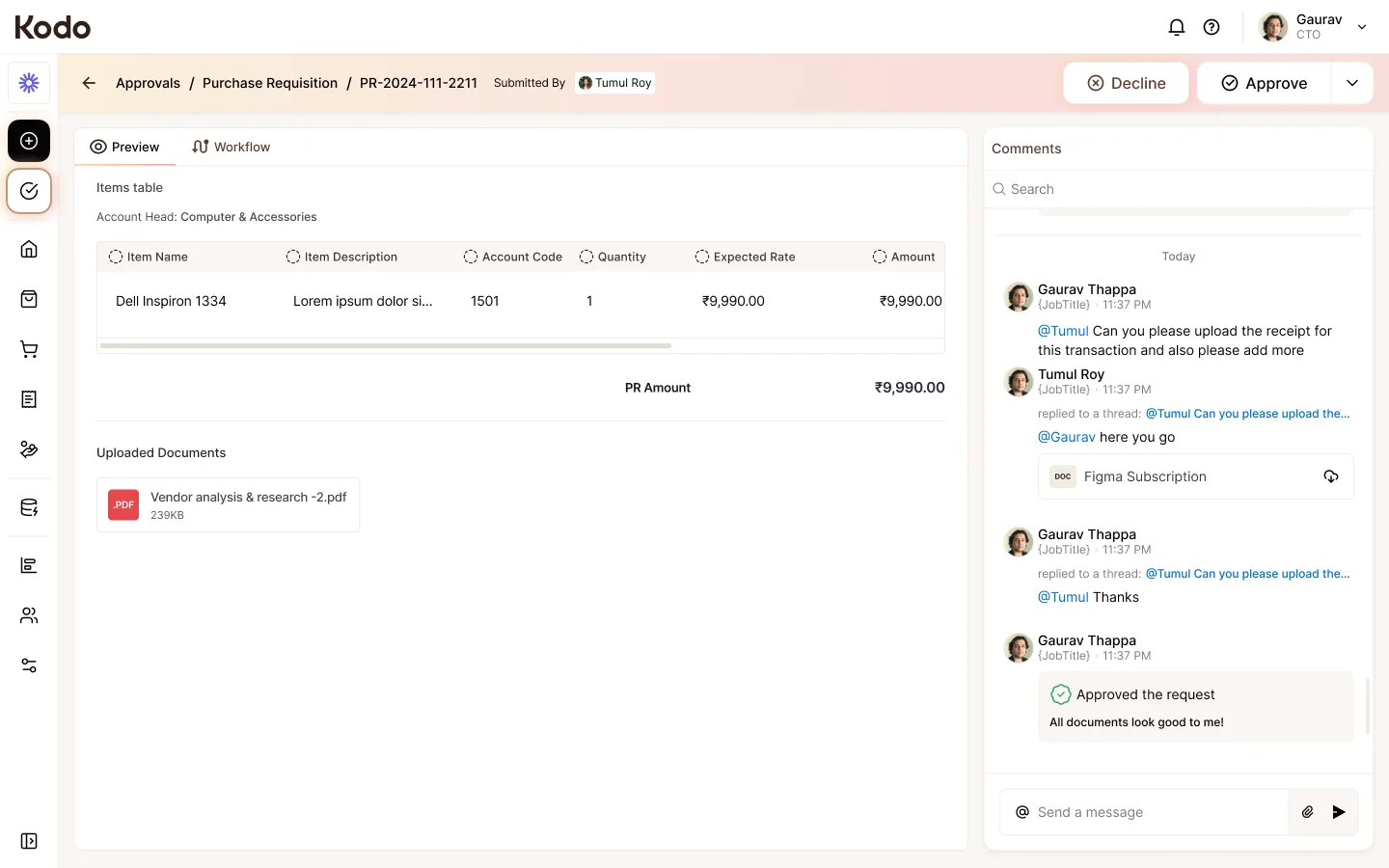
I designed the workflow builder and the approval experience on every document: how admins set up a flow, and how requesters, makers and checkers see where a document is and what they need to do.
Approach
Treat a workflow as a readable sequence of levels, not a diagram to decode. Admins build multi-level chains with maker-checker steps; everyone else sees the same chain as a status on the document, with the current level and the next person to act.
Key decisions
- 1Dynamic, multi-level approval chains that admins configure per process.
- 2Maker-checker built in, so the person who creates a document is never the one who signs it off.
- 3One status pattern across requests, POs, GRNs and invoices, so a stuck document looks the same everywhere.
What shipped
Shipped in P2P v1: dynamic multi-level workflows with maker-checker, used by redBus and Brndme.
02 · Permissions
Make a detailed permission model feel simple.
Finance software has to be strict about who can see and do what. Kodo's permission system had to cover large organisations without becoming a wall of checkboxes.
The problem
Rights depend on several things at once: the person's role, the module, the action, and which part of the company they work in. Preset roles never fit every customer, so companies also needed their own roles.
My role
I designed the roles and permissions experience: preset and custom roles, rights per module and action, and scoping by entity, plus how those rules show up for end users.
Approach
Start from roles people already recognise, then let admins adjust. Rights are grouped by module, actions read as plain verbs, and scope is a separate, clear choice instead of another column in a giant matrix.
Key decisions
- 1Preset roles as a starting point, with custom roles for anything a company needs beyond them.
- 2Rights set per module and per action, grouped so admins can scan one module at a time.
- 3Scope by entity, such as a department or location, kept as its own step so the matrix stays readable.
What shipped
Shipped in P2P v1: role-based permissions with custom roles, per-module and per-action rights, and entity scoping.
03 · Mailbox to ledger
From a vendor's email to the books, without retyping.
Invoices arrive by email and end up in accounting software. The mailbox, reports and the Zoho and Tally integration closed the gap between those two ends.
The problem
Finance teams were copying invoice details out of inboxes and entering approved invoices again in their accounting tools. Every handoff was a chance for a typo or a missed payment.
My role
I designed the mailbox, the ledger and vendor mapping for Zoho and Tally, and the reporting suite: spend analytics, status and ageing reports, a custom report builder, and the audit trail.
Approach
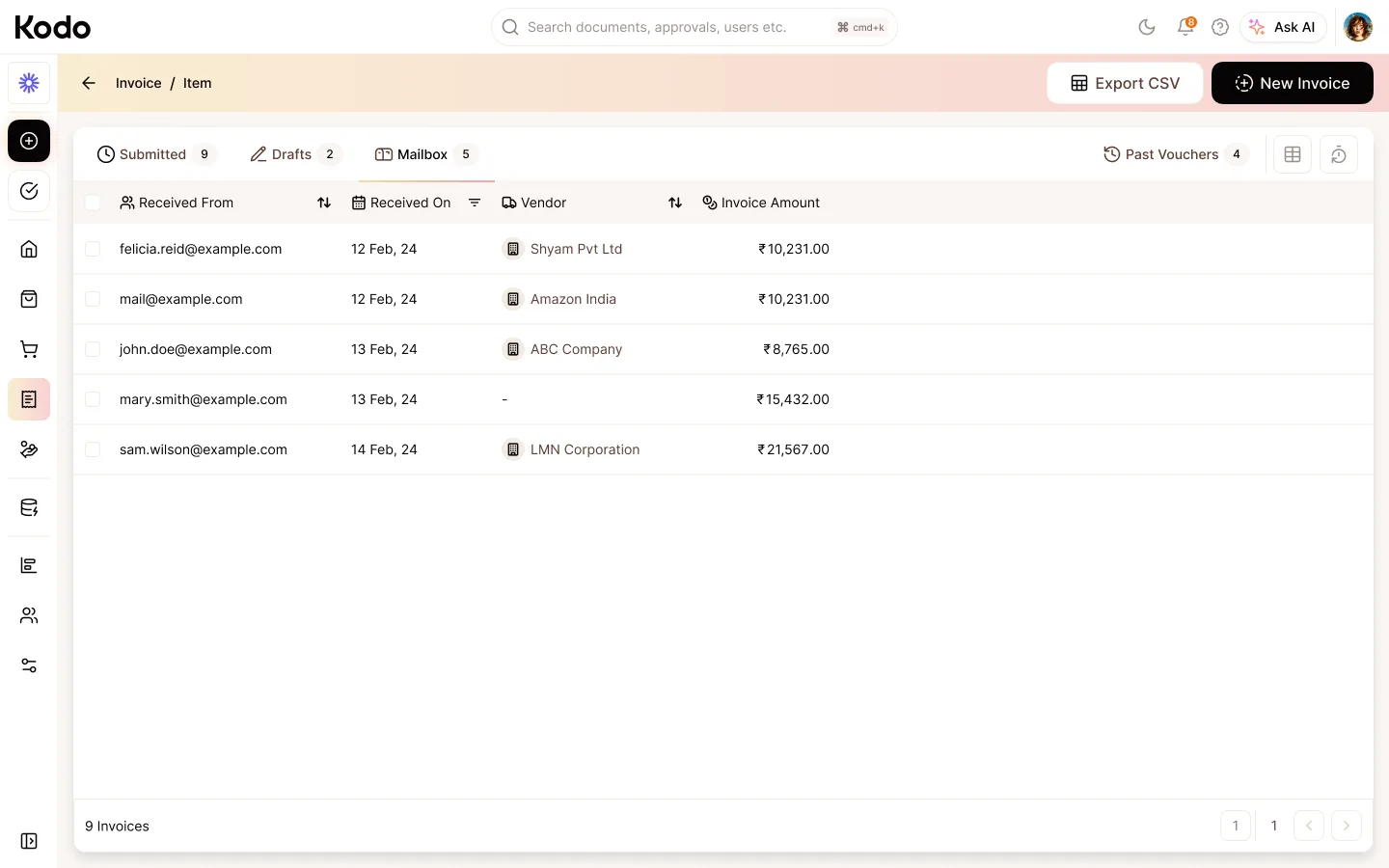
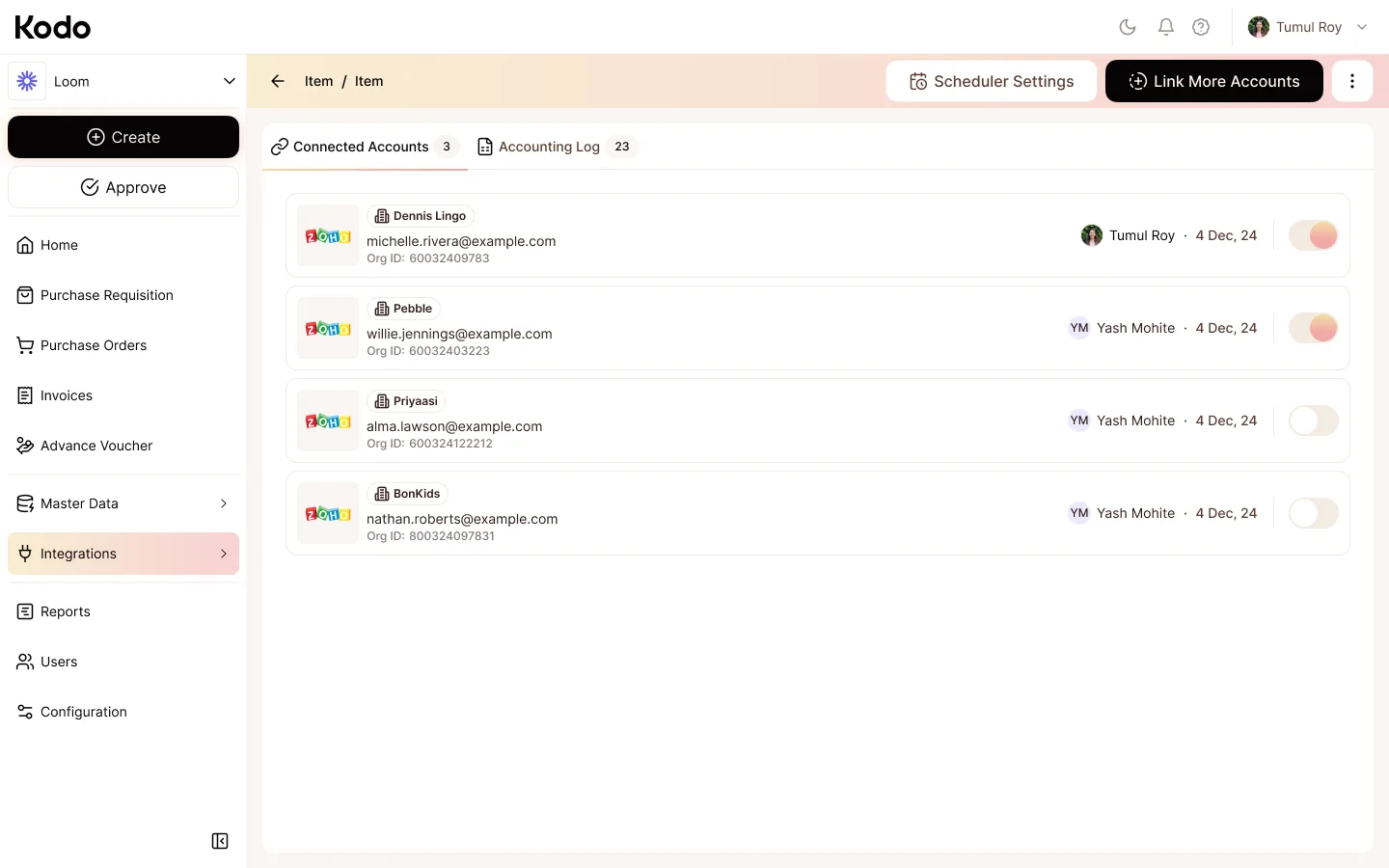
Let the invoice enter once and carry its context forward. The mailbox turns an emailed invoice into a document in the flow; one-time mapping links Kodo's vendors and accounts to the ledgers in Zoho or Tally; reports and the audit trail show what happened at each step.
Key decisions
- 1Invoice capture by email, so vendors keep sending invoices the way they already do.
- 2Map vendors and ledgers once, then reuse that mapping for every accounting entry.
- 3Reports for spend, status and ageing, a custom builder for everything else, and an audit trail on every document.
What shipped
Shipped in P2P v1: mailbox invoice capture, Zoho and Tally accounting integration with ledger and vendor mapping, reports and audit trail.
Interactive prototype
The Vendor Portal, inside procure-to-pay.
Vendors are the other side of every purchase order and invoice. This prototype of the Vendor Portal, which shipped in P2P v1, was also used in sales demos.
How I worked
Fast loops between customers, PMs and engineering.
We shipped quickly, mostly before AI design tools were common. Ideas moved from customer calls and PM research into rapid prototypes, and from there into handoff files engineers could build from.
- 01Customer callsDiscovery and feedback sessions with redBus and Brndme.
- 02Competitor auditHow existing P2P and ERP tools handle the same flows.
- 03Research with PMsRefining requirements and edge cases with product managers.
- 04Rapid prototypesQuick prototypes in Figma, and code prototypes in v0 and Figma Make.
- 05Dev handoff filesStructured Figma handoff files for each module.
- 06Sales prototypesClickable prototypes, like the Vendor Portal, for demos.
Design systems
Two systems, 1,000+ components.
I built two design systems with more than 1,000 components between them. They covered the P2P web workspace, the vendor portal and the corporate card app. Tamagui was the base for the P2P web workspace: one component set ready for web and React Native, tokens mapped one to one with Figma variables, and light and dark themes from the same tokens. A Material Design 2 → 3 system carried the corporate card app.
Tamagui
P2P web workspace
- One component set for web and React Native
- Tokens mapped one to one with Figma variables
- Light and dark themes from the same tokens
Material Design 2 → 3
Corporate card app
- Migrated the card app's base from MD2 to MD3
- New screens assembled from components
- The foundation for the card app revamp
People I worked with
Gaurav Thapa and Tumul Roy were direct partners in this work. Their recommendations speak to the collaboration behind the product and system decisions.
“iterate quickly without becoming superficial”
Gaurav ThapaOn complex workflows, configurable UI, and design systems“We partnered day-to-day from early discovery through enterprise rollout”
Tumul RoyOn the procure-to-pay product at Kodo
04 · Cards and NPCI
Payments work with the rules of India's payment rails.
Beyond P2P, I worked on Kodo's Corporate Cards product and on payment screens built to NPCI's standards.
The problem
Payment flows on NPCI's rails have to meet its rules before they can go live, and the corporate card app had grown on an older Material Design 2 base.
My role
I designed the Bharat Connect screens that NPCI approved, a UPI app demo, and a full revamp of the corporate card app on Material Design 3.
Approach
Keep the payment steps clear enough to pass NPCI review, and move the card app onto MD3 through a new component set rather than screen-by-screen fixes.
What I worked on
- 1Bharat Connect screens designed to NPCI's requirements, and approved by NPCI.
- 2A UPI app prototype that the team demonstrated at NPCI.
- 3The card app revamp built on an MD2 → MD3 design system, so new screens came from components.
What shipped
Bharat Connect screens shipped with NPCI approval. The UPI app was a demo, and the MD3 card app revamp was designed but not shipped.
Interactive prototype
The UPI app demo, shown at NPCI.
This Mobile UPI App prototype connects the Corporate Cards and payments side of the work. The team demonstrated it at NPCI.
05 · The website
Explain a broad platform without losing the thread.
The public site had to make a wide spend platform understandable to buyers of different sizes.
The problem
Accounts payable, vendor payments, cards, reimbursements and workflows solve related problems, but a list of features does not explain how they fit together.
My role
I designed the site in Figma and built it in Framer, including the structure, visual language and motion.
Approach
Lead with the outcome for the buyer, then open into product pillars, customer segments, workflows, integrations and collaboration.


Key decisions
- 1Organise the platform around clear product pillars instead of one long feature list.
- 2Give startup, mid-market and enterprise buyers their own entry points.
- 3Use workflow and integration examples to show the platform's depth.
What shipped
Live at kodo.com, designed in Figma and built in Framer with custom interactive components.
In retrospect
What shipped, and what stayed with me.
Shipped
- P2P v1, live with redBus and Brndme: requests and approvals, PO and GRN, invoices and payments, vendor portal and master data.
- Platform modules: workflow builder, permissions with custom roles, form builder, mailbox, reports, and Zoho and Tally sync.
- Two design systems with 1,000+ components: Tamagui for P2P web, MD2 → MD3 for the card app.
- NPCI-approved Bharat Connect screens, and kodo.com in Framer.
Designed, not shipped
- Reimbursements and Travel modules
- Corporate card app revamp on Material Design 3
- UPI app (demo shown at NPCI)
Lessons learned
- 1In an ERP, flexibility is the product. The design job is to keep it from turning into complexity.
- 2In financial products, clarity is part of control: people need to see the state of a document before they trust the next step.
- 3Shipping fast with enterprise customers works when prototypes, handoff files and the design system all speak the same language.
This account focuses on the work I contributed to. Kodo's company-wide customer and transaction figures are separate from the outcomes of these projects.